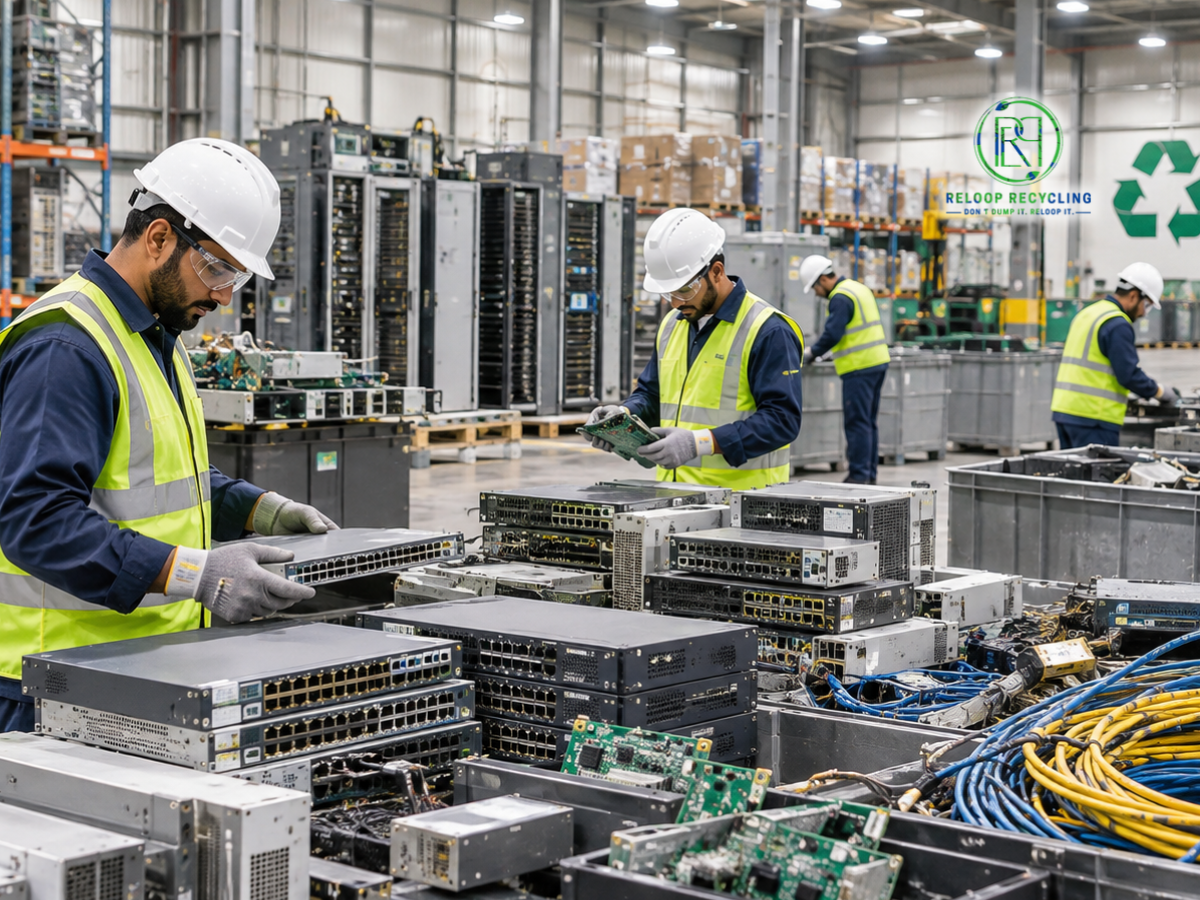
Data center decommissioning is the systematic process of retiring, dismantling, and removing IT infrastructure, equipment, and associated facilities that are no longer required by an organization. It involves more than simply switching off servers or disconnecting hardware. The process includes identifying assets, migrating or securely handling data, disconnecting IT systems, removing equipment, managing network dependencies, and ensuring that the facility is safely prepared for its next use or permanent closure.
By following a comprehensive decommissioning strategy, organizations can retire outdated infrastructure without compromising business operations, data security, or regulatory obligations. It also enables them to optimize IT resources, reduce operational costs, and transition toward more flexible, scalable, and modern technology environments.
What Are the Key Steps in Data Center Decommissioning?
Data center decommissioning involves a series of carefully coordinated activities to retire IT infrastructure, protect business data, remove equipment, and prepare the facility for closure or reuse. Following a structured process helps organizations minimize operational disruptions, maintain data security, meet compliance requirements, and recover value from retired IT assets.
Although the exact activities may vary depending on the size and complexity of the facility, a typical data center decommissioning project consists of the following ten key steps.
Step 1: Assess the Existing Data Center Infrastructure
The first step is to conduct a comprehensive assessment of the existing data center environment. Organizations need a clear understanding of the infrastructure that must be retired, including physical equipment, software, applications, and supporting systems.
This assessment typically involves:
- Identify IT infrastructure: Locate all servers, storage systems, networking equipment, racks, switches, routers, and other hardware.
- Review hardware inventory: Record equipment details such as asset tags, serial numbers, ownership, configuration, location, and operational status.
- Identify dependencies: Map relationships between servers, applications, databases, storage systems, and network connections to understand potential operational impacts.
- Evaluate infrastructure condition: Assess equipment age, performance, maintenance requirements, physical condition, and potential reuse or resale value.
A detailed infrastructure assessment establishes an accurate baseline for the project and helps prevent critical assets, applications, or dependencies from being overlooked.
Step 2: Develop a Data Center Decommissioning Plan
Once the infrastructure assessment is complete, the next step is to develop a comprehensive decommissioning plan. This document serves as the project roadmap, defining how equipment, applications, data, and facility infrastructure will be retired.
Key planning activities include:
- Define project scope: Establish which systems, equipment, applications, and facility components are included in the decommissioning project.
- Establish timelines and milestones: Create a realistic schedule covering assessment, migration, shutdown, equipment removal, transportation, and final closure.
- Assign responsibilities: Allocate tasks to IT teams, infrastructure specialists, security personnel, facilities managers, vendors, and other stakeholders.
- Prepare risk management procedures: Identify potential risks, including data loss, service interruptions, equipment damage, security breaches, and compliance issues. Establish mitigation and contingency plans.
- Create a communication plan: Define how project updates, shutdown notifications, migration schedules, and potential service impacts will be communicated to employees, customers, and relevant stakeholders.
A well-defined plan ensures that all stakeholders understand their responsibilities and that decommissioning activities are completed in a controlled and coordinated manner.
Step 3: Perform Data Backup and Migration
Data protection is one of the most critical aspects of data center decommissioning. Before shutting down any system, organizations must ensure that essential business information is securely backed up and that required workloads are successfully migrated to their new environments.
This step generally includes:
- Identify critical business data: Determine which databases, applications, files, configurations, and business records must be retained.
- Back up essential information: Create secure backups and verify that recovery procedures are available if unexpected issues occur.
- Migrate workloads: Transfer applications, databases, and other workloads to replacement data centers, cloud platforms, or alternative IT infrastructure.
- Validate data integrity: Verify that migrated information is complete, accurate, accessible, and functioning as expected.
- Obtain stakeholder approval: Secure confirmation from application owners, business teams, and IT stakeholders that migration activities have been completed successfully.
Organizations should not proceed with shutting down critical systems until the necessary data migration and validation activities have been completed and approved.
Step 4: Identify and Disconnect IT Assets
After data migration and validation, organizations can begin preparing individual IT assets for shutdown. This involves confirming which equipment is ready for retirement and understanding how each component connects to the broader infrastructure.
The key activities include:
- Identify equipment: Locate servers, storage devices, network switches, routers, racks, and other assets scheduled for decommissioning.
- Map network connections: Document network ports, power connections, cabling routes, and interdependencies between devices.
- Schedule equipment shutdowns: Coordinate shutdown windows with application owners and IT teams to avoid unexpected service interruptions.
- Follow approved shutdown procedures: Use documented procedures to safely stop applications, services, operating systems, and hardware components.
Proper identification and controlled disconnection help prevent accidental shutdowns of active systems and reduce the risk of disrupting business operations.
Step 5: Perform Secure Data Destruction
Once equipment has been disconnected and its required data has been migrated or retained, organizations must ensure that sensitive information is permanently removed from retired storage devices.
Simply deleting files or formatting a drive may not eliminate the underlying data. Therefore, organizations should use approved data sanitization methods based on the device type, data sensitivity, and applicable security requirements.
Important activities include:
- Identify data-bearing devices: Locate hard disk drives (HDDs), solid-state drives (SSDs), backup tapes, storage arrays, USB devices, and other media containing business information.
- Apply approved sanitization methods: Select appropriate techniques such as secure data erasure, cryptographic erasure, or physical destruction.
- Perform secure erasure or physical destruction: Ensure that data cannot be recovered using commonly available techniques or that devices are physically destroyed when required.
- Maintain certificates and audit records: Document the devices processed, sanitization methods used, completion dates, and responsible personnel. Obtain certificates of data destruction where applicable.
- Follow data protection requirements: Ensure that data sanitization activities comply with relevant organizational policies, contractual obligations, and applicable regulatory standards.
Secure data destruction protects organizations against unauthorized data recovery, information leakage, identity theft, and potential compliance violations.
Step 6: Remove and Deinstall Data Center Equipment
After completing the required data destruction procedures, the physical removal of IT equipment can begin. This stage requires careful handling to prevent damage to equipment, infrastructure, and personnel.
Typical activities include:
- Disconnect power and network cables: Safely isolate equipment from electrical supplies, network connections, and supporting infrastructure.
- Remove servers and storage equipment: Carefully extract servers, storage arrays, switches, routers, and other hardware from racks and cabinets.
- Dismantle racks where required: Remove server racks, cabinets, mounting systems, and associated components when they are no longer needed.
- Handle equipment safely: Follow appropriate lifting, packaging, electrical safety, and equipment-handling procedures.
- Document removed assets: Update inventory records with asset identification numbers, removal status, physical condition, and destination details.
A systematic equipment removal process reduces the likelihood of workplace accidents, hardware damage, and asset tracking discrepancies.
Step 7: Transport and Manage IT Assets
Once equipment has been removed from the data center, organizations must arrange its secure transportation to designated storage facilities, refurbishment centers, resale partners, or authorized recycling facilities.
Effective asset management during transportation is essential for maintaining security, accountability, and traceability.
The main activities include:
- Categorize reusable and obsolete equipment: Separate functional equipment suitable for redeployment or resale from damaged, outdated, or end-of-life hardware.
- Arrange secure transportation: Use appropriate packaging, handling procedures, and secure logistics providers to protect equipment during transit.
- Maintain chain-of-custody documentation: Record asset transfers, responsible personnel, collection details, transportation information, and receiving-party confirmation.
- Track assets throughout the process: Maintain updated records of equipment locations, movement, ownership, and final disposition.
These measures help prevent equipment loss, unauthorized access, and asset mismanagement while ensuring that every item can be accounted for throughout the decommissioning process.
Step 8: Recycle, Resell or Dispose of IT Equipment
After transportation, organizations must determine the most appropriate end-of-life solution for each retired IT asset. Rather than disposing of all equipment as waste, businesses can recover value through reuse, refurbishment, resale, and responsible recycling.
This stage generally involves:
- Identify equipment for reuse: Evaluate functional servers, storage devices, networking equipment, and other components that can support future IT requirements.
- Evaluate resale opportunities: Determine the potential resale value of usable equipment through certified IT asset disposition (ITAD) providers or secondary equipment markets.
- Recycle electronic waste responsibly: Ensure that obsolete or non-reusable equipment is processed through environmentally responsible recycling channels.
- Work with authorized recycling partners: Select qualified service providers that follow applicable environmental, safety, and data security requirements.
- Maintain disposal documentation: Collect asset disposition records, recycling certificates, resale documentation, and other relevant evidence.
Responsible IT asset disposition helps organizations reduce electronic waste, recover residual asset value, support sustainability goals, and meet environmental obligations.
Step 9: Decommission Power, Cooling and Facility Infrastructure
Data center decommissioning extends beyond IT hardware. Organizations must also address the physical infrastructure that supports the facility, including electrical systems, backup power equipment, cooling systems, and cabling.
This stage should be coordinated with qualified electrical, mechanical, and facilities professionals.
Key activities include:
- Disconnect redundant power systems: Safely isolate unused power distribution units (PDUs), electrical panels, power feeds, and supporting electrical infrastructure.
- Decommission UPS and battery systems: Follow appropriate procedures for shutting down, removing, transporting, and recycling uninterruptible power supply (UPS) equipment and batteries.
- Address cooling infrastructure: Decommission cooling units, chillers, air handling systems, and associated components while following applicable refrigerant handling and environmental requirements.
- Remove unused cabling: Identify and remove redundant power, network, and fiber-optic cabling where appropriate.
- Coordinate facility handover: Inspect the premises, address restoration requirements, verify safety conditions, and prepare the facility for its next use or formal closure.
Because these systems involve electrical, mechanical, and environmental risks, their removal should be performed by appropriately qualified professionals following approved safety procedures.
Step 10: Conduct Final Audit and Project Closure
The final step is to conduct a comprehensive audit to confirm that all decommissioning activities have been completed according to the approved project plan.
This stage provides evidence that infrastructure has been retired, sensitive data has been securely handled, and all assets have been properly accounted for.
The final activities include:
- Verify asset removal: Reconcile the original infrastructure inventory with removed, redeployed, resold, recycled, and disposed-of equipment.
- Confirm data destruction: Review data sanitization records, destruction certificates, and supporting audit documentation.
- Review compliance documentation: Ensure that relevant security, environmental, contractual, and regulatory requirements have been addressed.
- Obtain final approvals: Secure sign-off from IT management, security teams, facilities personnel, business stakeholders, and other responsible parties.
- Prepare a decommissioning completion report: Document completed activities, asset disposition, data destruction outcomes, project risks, exceptions, costs, and final facility status.
A final audit establishes accountability and provides a documented record of the entire decommissioning project. It also helps organizations identify lessons learned and improve future infrastructure retirement initiatives.
By completing these ten steps, organizations can ensure a controlled and secure data center decommissioning process. A structured approach minimizes business disruption, protects sensitive information, supports regulatory compliance, maximizes IT asset recovery, and ensures that facilities are safely prepared for closure or repurposing.
Data Center Decommissioning Checklist
A data center decommissioning checklist helps organizations manage every stage of the retirement process in a structured, secure, and efficient manner. It ensures that critical activities are completed, responsibilities are clearly defined, and important requirements are not overlooked. From initial planning and infrastructure assessment to data migration, equipment removal, secure data destruction, and final facility closure, each phase should be carefully tracked and verified.
The following checklist provides a practical overview of the key phases and activities involved in a successful data center decommissioning project.
| Phase | Key activities |
|---|---|
| Planning | Define project scope, establish timelines, prepare an asset inventory, assign responsibilities, and develop a communication plan. |
| Assessment | Identify servers, storage systems, networking equipment, hardware conditions, application dependencies, and critical infrastructure. |
| Migration | Back up essential data, migrate applications and workloads, validate data integrity, and obtain stakeholder approval. |
| Shutdown | Schedule and perform application, server, storage, and network equipment shutdowns using approved procedures. |
| Data security | Identify data-bearing devices, perform secure data sanitization or physical destruction, and maintain destruction certificates. |
| Removal | Disconnect power and network connections, dismantle equipment, remove hardware, and update asset records. |
| Logistics | Package equipment securely, arrange transportation, maintain chain-of-custody records, and track asset movement. |
| Disposal | Identify equipment for reuse or resale, recycle electronic waste responsibly, and maintain final disposition records. |
| Closure | Decommission power and cooling infrastructure, complete facility handover, conduct final audits, and prepare project completion documentation. |
Using this checklist throughout the project helps organizations maintain visibility, improve accountability, reduce operational risks, and ensure that all data center decommissioning activities are completed before final closure.
Why Is Proper Data Center Decommissioning Important?
Proper data center decommissioning is essential for protecting business information, maintaining regulatory compliance, reducing infrastructure costs, and ensuring the responsible retirement of IT assets. An unplanned or poorly executed decommissioning project can expose organizations to data breaches, operational disruptions, financial losses, and environmental liabilities.
A structured decommissioning approach helps organizations manage these risks while maximizing the value of retired infrastructure. Its importance can be understood through the following benefits:
- Data Security and Protection: Data centers contain sensitive business information, customer records, financial data, and intellectual property. Proper decommissioning ensures that data is securely backed up, migrated, sanitized, or destroyed before equipment leaves the facility.
- Regulatory Compliance: Organizations must follow applicable data protection, information security, and environmental regulations when retiring IT infrastructure. Proper documentation, secure data destruction, and responsible equipment disposal help demonstrate compliance.
- Reduced Operational Costs: Retiring outdated servers, storage systems, and supporting infrastructure reduces maintenance expenses, energy consumption, cooling requirements, and ongoing facility operating costs.
- Prevention of Data Breaches: Improperly handled storage devices can expose confidential information to unauthorized individuals. Approved data sanitization and physical destruction procedures help prevent sensitive information from being recovered or misused.
- Efficient IT Asset Recovery: Decommissioning provides an opportunity to recover value from functional equipment through refurbishment, redeployment, resale, and responsible asset disposition.
- Environmentally Responsible Disposal: Proper recycling and disposal practices help reduce electronic waste, recover valuable materials, and prevent hazardous components from causing environmental damage.
- Reduced Infrastructure Risks: Retiring aging and unsupported infrastructure reduces exposure to hardware failures, security vulnerabilities, power inefficiencies, and maintenance-related operational risks.
Ultimately, proper data center decommissioning allows organizations to retire infrastructure securely, efficiently, and responsibly while supporting long-term IT modernization goals.
5. Common Challenges in Data Center Decommissioning
Data center decommissioning involves multiple technical, operational, security, and logistical activities. Organizations often face challenges when managing large infrastructure environments, coordinating different teams, protecting sensitive information, and ensuring that every asset is properly accounted for.
Understanding these challenges in advance helps organizations develop effective mitigation strategies and avoid unnecessary delays or expenses.
Common challenges include:
- Incomplete IT Asset Inventory: Organizations may lack accurate records of installed servers, storage devices, networking equipment, and other hardware. Missing or outdated inventory information can result in overlooked assets, incorrect removal decisions, and difficulties tracking equipment.
- Business Downtime: Shutting down critical applications, databases, or infrastructure without proper coordination can disrupt business operations. Organizations must carefully schedule shutdown activities and validate workload migration before retiring systems.
- Data Security Risks: Storage devices may contain confidential information even after applications and systems have been disconnected. Inadequate sanitization, improper handling, or unauthorized access during transportation can expose sensitive business data.
- Legacy Hardware and Compatibility Issues: Older infrastructure may use unsupported operating systems, outdated configurations, proprietary components, or specialized connections. These limitations can make data migration, equipment removal, and infrastructure retirement more complicated.
- Complex Network Dependencies: Applications, servers, databases, and network devices often depend on shared infrastructure. Disconnecting one component without understanding these dependencies can affect other operational systems.
- Equipment Transportation Risks: Improper packaging, handling, and transportation can result in hardware damage, equipment loss, or security incidents. Maintaining asset tracking and chain-of-custody documentation is essential.
- Regulatory and Environmental Compliance: Organizations must manage data destruction, electronic waste, batteries, and other potentially hazardous materials according to applicable requirements. Failure to follow these obligations can result in legal, financial, and reputational consequences.
Addressing these challenges through proper planning, detailed documentation, experienced personnel, and controlled execution helps ensure a successful decommissioning project.
6. What Are the Best Practices for Data Center Decommissioning?
Following industry-recognized best practices helps organizations complete data center decommissioning projects securely, efficiently, and with minimal business disruption. A structured approach ensures that infrastructure is properly assessed, critical data is protected, equipment is accounted for, and retired assets are handled responsibly.
The following best practices can improve the overall decommissioning process:
- Create a Detailed Project Plan: Establish the project scope, timelines, milestones, responsibilities, resource requirements, and risk management procedures before beginning decommissioning activities.
- Maintain an Accurate Asset Inventory: Document all servers, storage systems, networking equipment, racks, power infrastructure, and other assets. Include serial numbers, asset tags, ownership, condition, and final disposition details.
- Back Up and Validate Business-Critical Data: Identify essential business information, create secure backups, and migrate workloads to replacement infrastructure or cloud environments. Validate data integrity and application functionality before shutting down existing systems.
- Use Approved Data Destruction Methods: Apply appropriate data sanitization techniques, including secure erasure, cryptographic erasure, or physical destruction, depending on the device and security requirements.
- Maintain Chain-of-Custody Records: Track equipment from its original location through collection, transportation, storage, processing, and final disposition to maintain accountability and security.
- Partner with Experienced ITAD Providers: Work with qualified IT asset disposition (ITAD) providers that offer secure equipment removal, data destruction, asset recovery, resale, and recycling services.
- Follow Environmental Disposal Requirements: Ensure that obsolete hardware, batteries, electronic components, and other materials are reused, recycled, or disposed of through appropriate authorized channels.
- Conduct a Final Compliance Audit: Review asset inventories, data destruction certificates, recycling records, transportation documentation, and project approvals before formally closing the project.
Implementing these practices helps organizations reduce risks, improve operational efficiency, maintain compliance, and maximize the value recovered from retired IT infrastructure.
7. How Long Does Data Center Decommissioning Take?
The time required for data center decommissioning depends on the size of the facility, the volume of IT equipment, infrastructure complexity, data migration requirements, security procedures, and the availability of project resources.
A small server room with limited hardware may require significantly less time than a large enterprise data center containing thousands of servers, multiple storage systems, complex network architecture, and critical business applications.
The following estimates provide general planning guidance rather than fixed industry timelines.
| Data center size | Indicative timeline | Key considerations |
|---|---|---|
| Small data center | A few days to several weeks | Limited hardware, straightforward dependencies, smaller data volumes, and relatively simple equipment removal. |
| Medium-sized data center | Several weeks to a few months | Larger asset inventory, multiple applications, workload migration, network dependencies, and coordinated equipment removal. |
| Large enterprise data center | Several months to a year or longer | Extensive infrastructure, complex application dependencies, large-scale data migration, multiple stakeholders, compliance requirements, and facility-level decommissioning. |
Factors That Affect Data Center Decommissioning Duration
Several factors influence how long the overall project takes:
- Infrastructure Size and Complexity: A facility containing thousands of servers, storage arrays, network devices, and supporting systems requires more assessment, coordination, and removal work.
- Data Migration Requirements: Moving large volumes of business data and applications to new data centers or cloud environments can extend project timelines, particularly when extensive validation is necessary.
- Application Dependencies: Complex relationships between applications, databases, and network infrastructure require detailed analysis before systems can be safely disconnected.
- Data Security Requirements: Secure data sanitization, physical destruction, certification, and audit procedures can add time depending on the number and type of storage devices.
- Equipment Removal and Transportation: Specialized handling, packaging, logistics coordination, and transportation arrangements can affect the schedule.
- Regulatory and Environmental Requirements: Additional approvals, documentation, and specialized disposal procedures may be necessary for certain equipment and materials.
- Resource Availability: The availability of IT specialists, facilities teams, security personnel, logistics providers, and external service partners also influences project completion.
Organizations should develop timelines based on a detailed infrastructure assessment rather than relying on a standard duration. Allowing sufficient time for migration validation, security checks, equipment removal, and final audits helps prevent delays and operational risks.
8. What Equipment Is Included in Data Center Decommissioning?
Data center decommissioning covers more than servers and storage devices. It includes the removal, retirement, and responsible disposition of all IT hardware and supporting infrastructure that is no longer required.
The exact equipment included depends on the facility’s design, operational requirements, and decommissioning scope.
Common equipment categories include:
- Servers and Storage Systems: Physical servers, blade servers, rack servers, storage arrays, direct-attached storage (DAS), network-attached storage (NAS), and storage area network (SAN) devices.
- Network Switches and Routers: Ethernet switches, core switches, routers, firewalls, load balancers, and other networking devices that support data communication.
- Server Racks and Cabinets: Server enclosures, cabinets, mounting rails, rack accessories, and associated equipment used to house IT infrastructure.
- UPS and Batteries: Uninterruptible power supply systems and backup batteries that provide temporary power during electrical interruptions.
- Power Distribution Units: Rack-mounted and facility-level power distribution units (PDUs), electrical distribution equipment, and associated power components.
- Cooling Systems: Computer room air conditioning (CRAC) units, computer room air handling (CRAH) systems, chillers, cooling distribution equipment, and associated components.
- Fiber and Copper Cabling: Fiber-optic cables, Ethernet cables, patch panels, structured cabling, and other connectivity infrastructure.
- Backup and Tape Storage Systems: Tape libraries, tape drives, backup appliances, removable storage media, and other data protection equipment.
Each equipment category requires appropriate handling, documentation, and disposition procedures. For example, servers and storage devices require particular attention to data sanitization, while batteries and cooling equipment may require specialized environmental handling.
Identifying all infrastructure components during the initial assessment ensures that nothing is overlooked during the decommissioning process.
9. Data Center Decommissioning vs. Data Center Migration
Data center decommissioning and data center migration are closely related processes, but they serve different purposes. Migration focuses on transferring applications, workloads, data, and IT infrastructure from one environment to another. Decommissioning focuses on securely retiring the existing infrastructure after its operational requirements have been addressed.
Organizations often perform both activities as part of a broader IT modernization, cloud adoption, infrastructure consolidation, or facility relocation initiative.
The following table highlights their key differences:
| Comparison factor | Data center decommissioning | Data center migration |
|---|---|---|
| Definition | The process of retiring, dismantling, and removing data center infrastructure. | The process of transferring IT workloads, applications, data, and systems to another environment. |
| Primary objective | Safely and securely retire outdated or unnecessary infrastructure. | Move IT operations to a new data center, cloud platform, or alternative infrastructure. |
| Main activities | Asset assessment, shutdown, data sanitization, equipment removal, recycling, and facility closure. | Workload assessment, data transfer, application migration, testing, and validation. |
| Infrastructure focus | Existing equipment scheduled for retirement or disposal. | Existing systems and their target infrastructure. |
| Data management | Secure backup, retention, sanitization, and destruction of data. | Data replication, transfer, synchronization, and integrity validation. |
| Business continuity | Ensures services are safely retired without unintended disruption. | Ensures applications and workloads remain available during and after migration. |
| Asset management | Focuses on equipment removal, reuse, resale, recycling, and disposal. | Focuses on relocating or recreating the required IT capabilities in the destination environment. |
| Final outcome | Infrastructure is retired and the facility is prepared for closure or reuse. | Applications, workloads, and data operate in the new environment. |
How Are Data Center Decommissioning and Migration Related?
Migration and decommissioning are often two connected phases of the same infrastructure transformation project.
For example, when an organization moves its applications and databases from an on-premises data center to a cloud environment, the migration team first transfers the workloads and validates their performance. Once business stakeholders confirm that the applications are operating correctly in the new environment, the organization can begin decommissioning the old infrastructure.
This sequence ensures that business-critical services are not retired before suitable replacement environments are available.
Therefore, while migration focuses on moving IT operations, decommissioning ensures that the previous infrastructure is securely and responsibly retired.
10. How to Choose a Data Center Decommissioning Company?
Choosing the right data center decommissioning company is important for ensuring that infrastructure retirement activities are completed securely, efficiently, and in accordance with applicable requirements.
An experienced service provider can manage multiple aspects of the project, including IT infrastructure assessment, data destruction, equipment removal, transportation, asset recovery, and electronic waste recycling.
Before selecting a provider, organizations should evaluate the following factors:
- Technical Experience: Choose a company with demonstrated experience in managing data center decommissioning projects involving servers, storage systems, networking equipment, power infrastructure, and complex facility environments.
- Data Destruction Capabilities: Verify that the provider offers secure data sanitization and physical destruction services using appropriate, documented methods. Ask about destruction certificates, audit trails, and applicable security standards.
- IT Asset Disposition (ITAD) Services: Look for providers that offer comprehensive ITAD services, including equipment assessment, asset tracking, refurbishment, resale, recycling, and responsible disposal.
- Environmental Compliance: Ensure that the company follows applicable environmental regulations and works with authorized recycling and waste management partners to handle electronic waste, batteries, and other materials responsibly.
- Secure Logistics: Evaluate the provider’s transportation procedures, packaging standards, equipment handling practices, security controls, and chain-of-custody documentation.
- Asset Recovery and Resale: Select a company that can identify reusable equipment, evaluate resale opportunities, and help recover residual value from retired IT assets.
- Reporting and Documentation: Ensure that the provider supplies detailed inventory reports, asset disposition records, data destruction certificates, recycling documentation, and final project completion reports.
Organizations should also evaluate service agreements, insurance coverage, project references, workforce capabilities, and the provider’s ability to manage projects within the required schedule.
Ultimately, the right decommissioning partner should offer a combination of technical expertise, data security, reliable logistics, responsible asset disposition, and transparent reporting. Working with an experienced provider helps organizations minimize risks, simplify project management, and achieve a secure and successful data center decommissioning outcome.
How do you safely decommission a server?
To safely decommission a server, first identify its applications, data, and infrastructure dependencies. Back up essential information and migrate required workloads to the replacement environment. Validate the migrated applications and obtain approval before scheduling the shutdown. Next, disconnect the server from power and network connections, perform approved data sanitization, and remove the hardware following appropriate safety procedures. Finally, update asset records and arrange for reuse, resale, or responsible recycling.
Why is data destruction important during decommissioning?
Data destruction is important because retired servers, hard drives, SSDs, and other storage devices may contain sensitive business information, customer records, financial data, and confidential files. Simply deleting files or formatting a device may not permanently eliminate stored information. Secure data sanitization or physical destruction helps prevent unauthorized data recovery, reduces the risk of data breaches, and supports applicable data protection and compliance requirements.
What happens to servers after data center decommissioning?
After decommissioning, servers are evaluated based on their condition, age, performance, and potential resale or reuse value. Functional equipment may be refurbished, redeployed, or resold after appropriate data sanitization. Outdated, damaged, or obsolete servers are sent to authorized electronic waste recycling facilities, where recoverable materials are processed responsibly. Organizations should maintain asset disposition records to document the final destination of every server.
What is the difference between data center migration and decommissioning?
Data center migration involves transferring applications, workloads, data, and IT systems from an existing environment to a new data center or cloud platform. Data center decommissioning involves securely retiring and removing the old infrastructure once it is no longer required. Migration focuses on moving IT operations, whereas decommissioning focuses on shutting down, sanitizing, removing, and responsibly disposing of retired infrastructure. Both processes are often performed together during infrastructure modernization projects.
How do companies dispose of old data center equipment?
Companies typically follow an IT asset disposition (ITAD) process to manage old data center equipment. First, assets are assessed and categorized according to their condition and potential reuse value. Functional equipment may be refurbished, redeployed, or resold, while obsolete or damaged hardware is sent to authorized electronic waste recyclers. Data-bearing devices must undergo appropriate data sanitization or physical destruction before reuse or disposal. Disposal certificates and asset tracking records help maintain accountability and compliance.
Why should businesses hire a professional decommissioning company?
Businesses should hire a professional data center decommissioning company to ensure that infrastructure retirement is managed safely, securely, and efficiently. Experienced providers can handle infrastructure assessment, asset inventory, secure data destruction, equipment removal, transportation, IT asset recovery, resale, and electronic waste recycling. They also provide specialized expertise, appropriate handling procedures, chain-of-custody records, and project documentation. Working with a qualified provider reduces operational risks, simplifies project coordination, and helps organizations achieve a compliant and cost-effective decommissioning process.

Raju Lajwani
 Connect on LinkedIn